
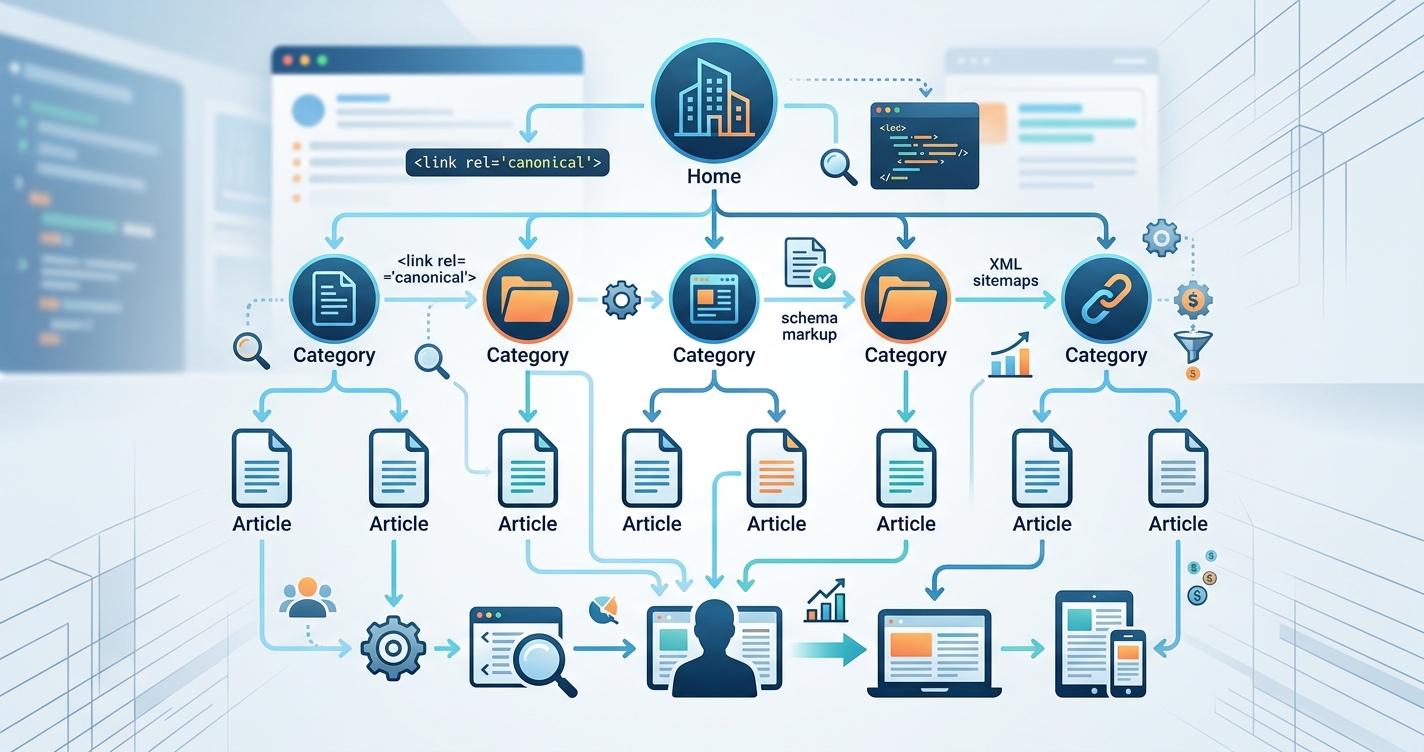
Your website could have the best content on the internet, but if search engines can’t figure out how to crawl it properly, you’re invisible. The way you organize your pages, categories, and internal links determines whether Google rewards you with rankings or buries you on page seven. Most bloggers build their sites backward, adding pages randomly and wondering why traffic never comes. A solid structure fixes that from day one.
Website structure for SEO means organizing your content so search engines can crawl it efficiently and users can find what they need fast. A logical hierarchy with clear categories, smart internal linking, and shallow click depth improves rankings, reduces bounce rates, and increases conversions. Most sites fail because they add pages without planning how everything connects.
Why search engines care about your site architecture
Google’s crawlers have a limited budget for your site. They won’t spend hours trying to figure out how your pages relate to each other.
If your homepage links to a category page, and that category links to ten posts, and those posts link to related content, Google sees a clear path. It understands your topic clusters. It knows which pages matter most.
But if you have orphan pages with no internal links pointing to them, Google might never find them. If your most important content sits five clicks away from your homepage, it looks less important than it actually is.
Search engines also use your structure to understand context. When you group related posts under a parent category, you’re signaling that these pieces belong together. That helps Google match your content to the right search queries.
Users care about structure too. If someone lands on a blog post and can’t figure out how to find more content like it, they leave. A clear navigation menu, visible categories, and related post links keep people on your site longer. That engagement signals quality to search engines.
Building a hierarchy that makes sense
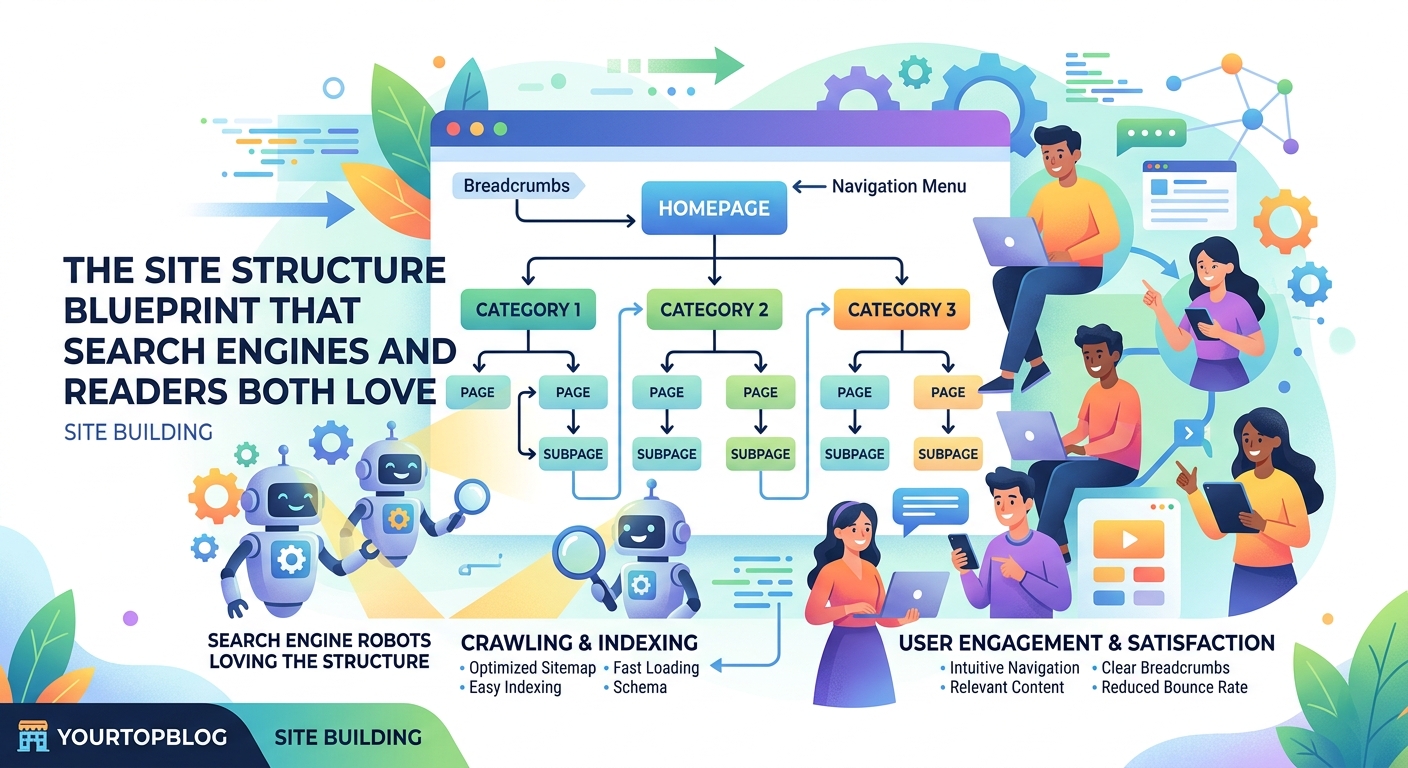
Start with your homepage at the top. This is your foundation.
Below that, create main category pages. These represent your core topics. If you run a food blog, your categories might be breakfast recipes, dinner ideas, and desserts. If you’re in the tech space, you might have software reviews, tutorials, and industry news.
Each category page should link to individual posts within that topic. Those posts can then link to related posts in the same category or adjacent ones.
Here’s what a simple three-level structure looks like:
- Homepage
- Category pages (one level down)
- Individual posts (two levels down)
This keeps everything within three clicks of your homepage. That’s the sweet spot for both users and crawlers.
Some sites add subcategories for more complex topics. A travel blog might have a “Europe” category, with subcategories for France, Italy, and Spain. That’s fine as long as you don’t go deeper than four levels total.
“The best site structure is the one where every important page can be reached in three clicks or fewer from the homepage. Anything deeper starts to lose authority and visibility.”
Internal linking strategies that pass authority
Internal links are your secret weapon. They tell Google which pages matter most and help distribute link equity across your site.
Start by linking from high-authority pages to newer or less-visited content. Your homepage has the most authority, so links from there carry weight. Category pages come next, then individual posts.
Use descriptive anchor text that tells both users and search engines what the linked page is about. Instead of “click here,” write something like how to find low competition keywords that actually drive traffic.
Add contextual links within your content. If you’re writing about traffic strategies, mention why your blog traffic isn’t growing and how to fix it when it makes sense.
Create hub pages that link to multiple related posts. A pillar post on monetization could link to guides on AdSense approval, affiliate programs, and passive income streams.
Avoid linking to the same page over and over in one post. One or two links per target page is plenty.
URL structure best practices
Your URLs should be clean, readable, and descriptive. They’re another signal to search engines about what your page covers.
Use hyphens to separate words, not underscores. Keep URLs short but meaningful. A URL like /website-structure-seo/ is better than /post12345/ or /category/blog/archives/2024/structure-guide/.
Include your target keyword in the URL when possible, but don’t force it. If your post is about on-page SEO checklists, a URL like /on-page-seo-checklist/ works perfectly.
Avoid changing URLs after you publish. If you must, set up 301 redirects from the old URL to the new one. Broken links hurt both user experience and rankings.
Keep your URL structure consistent. If you use /category/post-name/ for one post, use it for all posts in that category. Consistency helps search engines understand your site faster.
Navigation menus that guide users and crawlers
Your main navigation menu is one of the first things both users and search engines see. It should include your most important categories and pages.
Limit your top-level menu items to five or seven. Too many options overwhelm visitors and dilute link equity. Use dropdown menus for subcategories if needed, but keep them organized.
Include a search bar so users can find specific content. Add breadcrumb navigation to show where they are in your site hierarchy. Breadcrumbs look like this: Home > Category > Post Title.
Create a footer menu with links to essential pages like your about page, contact form, and privacy policy. You can also include secondary categories or popular posts here.
Make sure every page on your site can be reached through your navigation. Orphan pages that exist outside your structure won’t get crawled or ranked.
Category pages that rank on their own
Most bloggers treat category pages as boring lists of posts. That’s a missed opportunity.
Turn your category pages into valuable resources. Add a 300 to 500 word introduction that explains what the category covers and why it matters. Include your target keyword naturally.
Link to your best posts within that category. Highlight cornerstone content that new visitors should read first.
Optimize your category page titles and meta descriptions. If your category is “traffic generation,” your title might be “Traffic Generation Strategies for Bloggers” and your description could explain what readers will find.
Use schema markup to help search engines understand your category pages. This can improve how they appear in search results.
Update your category pages regularly. As you publish new posts, feature them on the relevant category page to keep the content fresh.
Common mistakes that hurt your structure
Here’s a table of frequent errors and how to fix them:
| Mistake | Why It Hurts | How to Fix It |
|---|---|---|
| Too many categories | Dilutes authority and confuses users | Consolidate into 5 to 10 main topics |
| Orphan pages | Google can’t find them | Add internal links from related content |
| Deep click depth | Important pages lose visibility | Flatten structure to 3 clicks or fewer |
| Broken internal links | Wastes crawl budget and frustrates users | Audit links monthly and fix breaks |
| No breadcrumbs | Users get lost, bounce rates increase | Add breadcrumb navigation sitewide |
| Duplicate content across categories | Confuses search engines | Assign each post to one primary category |
Another common issue is creating too many tags. Tags can be useful, but if you have hundreds of them with only one or two posts each, you’re creating thin content pages that don’t help anyone.
Some bloggers also make the mistake of hiding their best content in obscure subcategories. If you have a post that’s performing well, make sure it’s easy to find from your homepage or main category pages.
Technical elements that support good structure
Your sitemap tells search engines which pages exist on your site and how they’re organized. Generate an XML sitemap and submit it through Google Search Console.
Use robots.txt to control which pages crawlers should ignore. Block admin pages, duplicate content, and low-value pages like tag archives if they don’t add value.
Implement schema markup to give search engines more context about your content. Article schema, breadcrumb schema, and organization schema all help.
Make sure your site loads fast. Slow sites frustrate users and get penalized in rankings. Compress images, use caching, and choose reliable hosting.
Ensure your site is mobile-friendly. Most traffic comes from phones now, and Google uses mobile-first indexing. Your structure should work just as well on a small screen as on a desktop.
Set up Google Analytics and Search Console before you launch. These tools show you how users navigate your site and where they get stuck.
Planning structure before you launch
If you’re starting a new site, map out your structure before you publish anything. Decide on your main categories, plan your first 20 to 30 posts, and figure out how they’ll link together.
Create a spreadsheet with columns for post title, category, target keyword, and internal links. This helps you see gaps in your content plan and ensures you’re building a cohesive structure from the start.
If you already have a site with messy structure, it’s not too late. Audit your existing content, consolidate categories, add internal links, and redirect any broken URLs. It takes time, but the payoff in traffic and rankings is worth it.
Start with your highest-traffic pages. Make sure those are well-connected to related content. Then work your way through lower-traffic pages, adding them to your structure where they fit.
Measuring the impact of your structure
Track these metrics to see if your structure is working:
- Average pages per session (higher is better)
- Bounce rate (lower is better)
- Time on site (longer is better)
- Crawl stats in Search Console (more pages crawled means better structure)
- Organic traffic growth (should increase as structure improves)
Look at your internal link reports in Google Search Console. This shows which pages have the most internal links pointing to them. Your most important pages should have the most links.
Check your site’s crawl efficiency. If Google is crawling hundreds of low-value pages and missing your best content, your structure needs work.
Monitor rankings for your category pages. If they’re not showing up in search results, they might need better optimization or more internal links.
Use heatmaps to see where users click on your pages. If they’re ignoring your navigation menu or missing important links, adjust your layout.
Scaling your structure as you grow
As your site grows, your structure needs to evolve. Adding new categories is fine, but do it strategically. Each new category should represent a substantial body of content, not just two or three posts.
Consider creating pillar pages for your main topics. These comprehensive guides link to all your related content and serve as authoritative resources. They also help organize your internal linking.
Review your structure every six months. Look for categories that are too broad or too narrow. Merge or split them as needed.
Add more internal links as you publish new content. Every new post should link to at least two or three related posts, and you should go back to older posts to add links to the new one.
Keep an eye on your site speed as you add pages. More content can slow things down if you’re not careful about optimization.
Real examples of effective structures
E-commerce sites often use a product hierarchy: Homepage > Category > Subcategory > Product. This works because it mirrors how people shop.
News sites use a date-based structure combined with topic categories: Homepage > Section > Article. They also use tags heavily to cross-reference related stories.
Niche blogs typically use a simple category structure: Homepage > Category > Post. This keeps things clean and easy to navigate.
Authority sites in competitive niches often use pillar pages with clusters of related posts. The pillar page ranks for a broad keyword, while cluster posts target long-tail variations.
Case studies like this food blogger’s journey show how proper structure contributes to traffic and revenue growth over time.
Tools that help you build and maintain structure
Use a plugin like Yoast SEO or Rank Math to manage your internal linking. They suggest related posts to link to and help you avoid broken links.
Screaming Frog is a desktop tool that crawls your site like Google does. It shows you broken links, orphan pages, and other structural issues.
Google Search Console’s URL Inspection tool lets you see how Google views individual pages. Use it to check if important pages are being indexed.
Ahrefs or SEMrush can show you which pages have the most internal links and which ones need more. They also reveal how your site structure compares to competitors.
A simple spreadsheet works for planning your structure. List your categories, posts, and how they connect before you build anything.
Avoiding the trap of over-optimization
You can overthink structure. Don’t spend months planning the perfect hierarchy. Start simple, publish content, and adjust as you learn what works.
Don’t force internal links where they don’t fit. Readers can tell when you’re linking just to link, and it hurts credibility.
Don’t create categories just to have more pages. Quality beats quantity every time.
Don’t obsess over having exactly three clicks to every page. That’s a guideline, not a law. Four clicks is fine if the path makes sense.
Focus on creating a structure that helps real people find what they need. If it works for humans, it usually works for search engines too.
Structure as a foundation for everything else
Your site structure affects every other aspect of SEO. Good structure makes keyword research more effective because you know where each piece of content fits.
It makes content creation easier because you have a clear plan for what to write next.
It improves monetization because visitors stay on your site longer and see more ads or affiliate links.
It supports traffic growth because search engines can find and rank more of your content.
It enables diversification because you can organize different revenue streams without confusing readers.
Think of structure as the foundation of a house. You can’t build walls, add furniture, or paint the rooms until the foundation is solid. Same goes for your website.
Making structure work for your specific niche
Different niches need different approaches. A recipe blog benefits from a structure organized by meal type, cuisine, or dietary restriction. A tech blog might organize by product category, tutorial type, or skill level.
Service businesses often structure their sites around their offerings: Homepage > Service Category > Individual Service > Case Studies. This guides potential clients through their decision process.
Personal brands might structure around content types: Blog > Podcast > Videos > Courses. This helps followers find their preferred format.
Affiliate sites often use comparison structures: Homepage > Product Category > Best X for Y > Individual Reviews. This matches how people search when they’re ready to buy.
Think about how your audience searches and what they need to know. Build your structure around that journey.
Updating old content to fit your structure
If you have existing content that doesn’t fit your new structure, you have a few options.
You can update and republish old posts, assigning them to the right categories and adding internal links. This is the best option for content that still gets traffic.
You can redirect multiple thin posts to one comprehensive guide. If you have five short posts about the same topic, combine them into one authoritative piece and redirect the old URLs.
You can delete content that’s outdated, off-topic, or performing poorly. Use 410 status codes for deleted pages or redirect them to related content if appropriate.
You can create new hub pages that link to existing content, giving old posts a place in your new structure without rewriting them.
Whatever you choose, document your changes. Keep a spreadsheet of redirects and updates so you don’t lose track.
Structure decisions that affect your long-term growth
Choosing between a flat structure (few categories, many posts) and a deep structure (many categories, subcategories) affects how you scale.
Flat structures are easier to manage when you’re small but can become overwhelming as you grow. Deep structures organize content better but can bury pages too far from your homepage.
Most successful blogs find a middle ground: enough categories to organize content clearly, but not so many that authority gets diluted.
Your structure also affects your domain name choice and platform decision. Some platforms handle complex structures better than others.
Think about where you want to be in two years. Will your structure support 500 posts? 1,000? Plan for growth without overcomplicating things today.
Why this matters more than most SEO tactics
You can write perfect content, build thousands of backlinks, and optimize every meta tag, but if your structure is broken, you’re fighting an uphill battle.
Structure is the one thing that touches every page on your site. Get it right, and everything else becomes easier. Get it wrong, and you’re constantly working around problems.
The best part? Once you set up good structure, it keeps working for you. New posts automatically fit into your system. Internal links distribute authority without manual effort. Users find what they need without getting lost.
Start with your structure. Make it logical, keep it simple, and build everything else on top of that foundation. Your traffic, rankings, and revenue will all benefit from this one decision done right.